PixelVerb-sa
Game Boy chiptune synth
How to install: there is no installer to run — close your DAW, copy the plug-in folder into C:\Program Files\Common Files\VST3 and open it again. Why no installer?
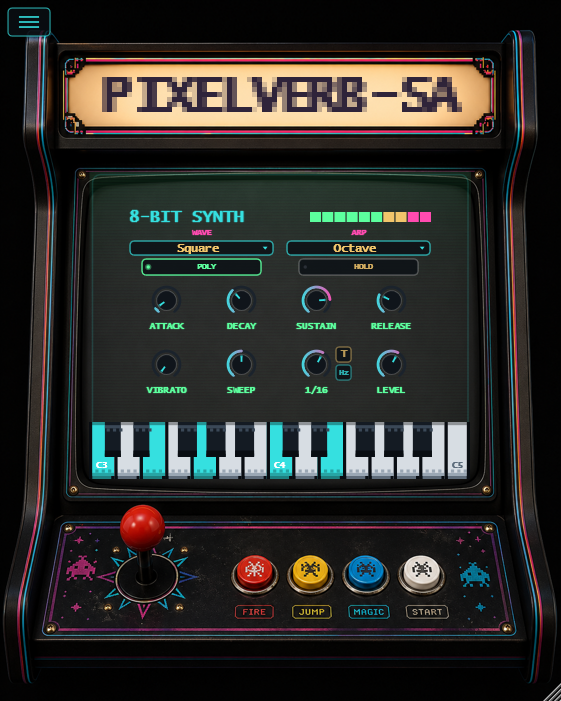
What it does
The real Game Boy sound
Four duty cycles of square wave, a four-bit triangle and a 15-bit noise generator — the three voices the DMG actually had. Volume is quantised to sixteen steps like the original chip, which is what gives it the steppy, brittle edge.
Arpeggiator
Hold a chord and it runs through it. Six patterns, six divisions from a half note to a sixty-fourth, and a T button for triplets. It locks to your project tempo, so it stays with the track.
Or cut it loose
The Hz button drops the arpeggiator off the grid and onto an absolute speed, up to 500 steps a second. Push it to the top and the arpeggio stops being a rhythm and becomes a texture — a second instrument hiding inside the first.
Sweep and vibrato
A pitch sweep locked to the tempo for risers and drops, with Hold to freeze the pitch where it is. Vibrato has its own depth, and the mod wheel adds more on top.
Mono or poly
Eight voices when you want chords, one when you want a lead. Pitch bend and mod wheel work throughout, and the on-screen keyboard plays with the mouse if you have no keyboard to hand.
Watch it in action
Hear it
The same four chords, played by the plug-in itself — first held, then with the arpeggiator running.
Arpeggiator off and on
The same chords held, then the arpeggiator switched on
PixelVerb-sa is a Game Boy chiptune synth — not a sample-based imitation but the same three voices rebuilt: square wave with four duty cycles, four-bit triangle, 15-bit noise, and volume quantised to sixteen steps the way the real chip did it.
The centrepiece is the arpeggiator. Hold a chord and it runs through it, locked to your project tempo, from a half note down to a sixty-fourth, with triplets on their own button. The Hz button cuts it loose from the grid and takes it up to 500 steps a second: up there it stops being a rhythm and becomes a texture.
Good for an arcade bassline, a lead that cuts through, or effects — the tempo-locked sweep makes risers and drops without touching automation.
It is free. No account, no licence to activate: download it and use it, commercial work included. If it earns its place, you can buy me a coffee.
Get PixelVerb-sa
Free download. No account, no activation.
Liked it? You can buy me a coffee — entirely optional.
Before you download
There is no installer: you copy one folder.
The ZIP holds the plug-in and three text files. There is no program to install — nothing in there runs, so Windows has nothing to stop.
Your browser may call it “not commonly downloaded”. That only means it is new, not that anything was found in it — check the fingerprint below if you like.
To install it:
- Close your DAW.
- Copy the folder
PixelVerb-sa.vst3intoC:\Program Files\Common Files\VST3 - Open it again — if it does not see the plug-in, rescan:
Ableton Live: Preferences → Plug-Ins, turn on “Use VST3 Plug-In System Folders”, then Rescan. It shows up under Plug-Ins → StarVerb Audio.
FL Studio: Options → Manage plugins → Find plugins. After the scan, load it from a mixer slot under Installed → Effects → VST3.
Windows asks for administrator permission at step 2: normal for a system folder.
Optional check — SHA-256 of the file:552f930eb251bf19e549885da91c590a0cc3acd578185aa3a44ac650a052ecdc